|
|
|
Transactions > Manage Bank Accounts
|
|
|
The Manage Bank Accounts page enables you to add or delete bank accounts that are used to make payments to your loans.
Choose the ‘Manage Bank Accounts’ icon to enter the external checking or savings
account information and follow these steps:
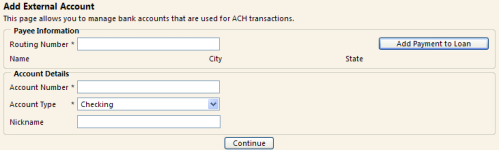
- From the ‘Add External Account’ page, enter the Routing Number of your financial institution.
Verify that the financial institution Name, City, and State populate correctly.
- Enter the Account Number.
- Choose the Account Type: Checking or Savings.
- Enter a Nickname of the Account (optional).
- Choose ‘Continue’ to accept the details of the Payment. Choose ‘OK’ or ‘Cancel’
to continue with the transaction.
-
|